Design Craft: Cut Files, Fonts
- 4.2
- Rating
- 50.00K
- Installs
- Free
- Price
 Analysis by App-foxy
When I opened Design Craft: Cut Files, Fonts, I expected a simple collection of decorative material for craft projects. What stood out instead was its focus on combining ready-made monograms, graphics, and fonts into something I could adapt for a cutting machine. That distinction matters: this is less like a full desktop illustration studio and more like a practical starting point for turning an idea into a personalized design.
The app sits in the Art & Design category and comes from One Music Player. It is free to install, rated for Everyone, and works on devices running Android 7.0 or later. The current release is version 1.2.21. Its audience is clearly people who make labels, gifts, signs, stickers, apparel designs, or other DIY projects, although the usefulness depends heavily on whether you already have a way to cut or print the finished work.
Why the monogram-focused design library matters
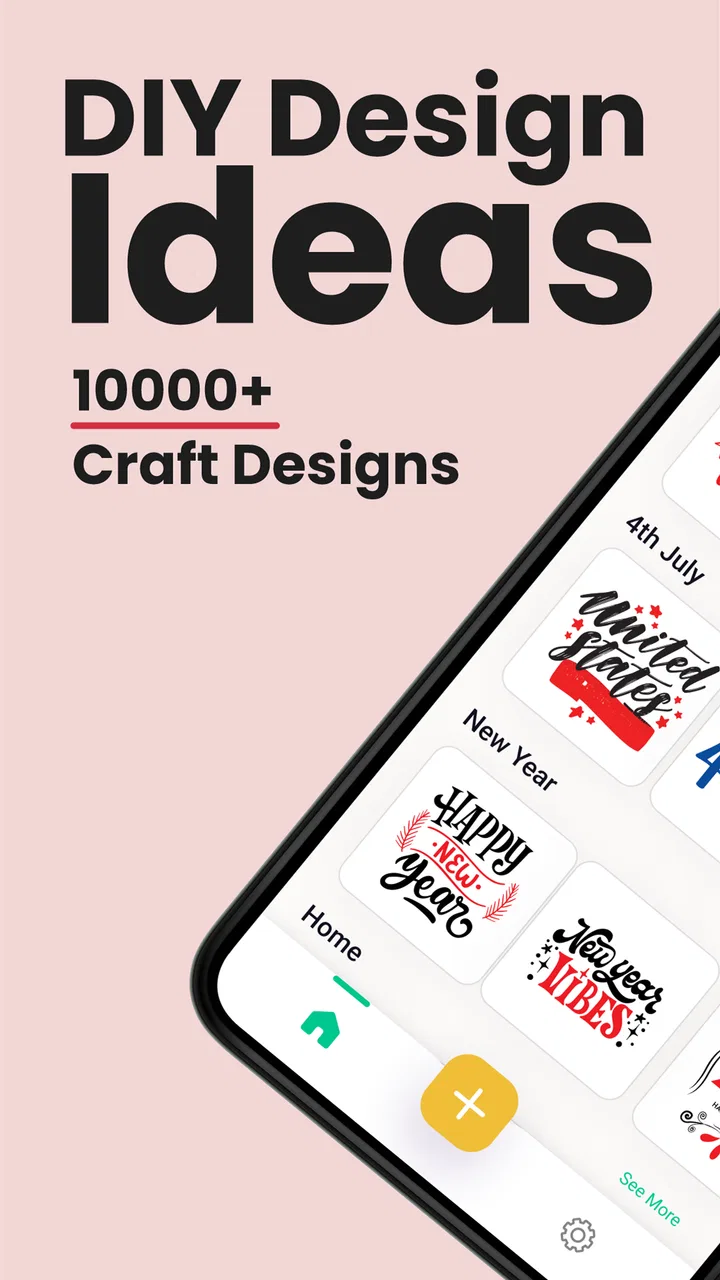
The most useful capability here is the ability to begin with a monogram or graphic instead of facing a blank canvas. That sounds modest, but it changes the first five minutes of a project. I do not have to invent a decorative frame, balance initials, or search for a suitable lettering style before I can see a possible result. I can start with a visual direction and then decide how much personalization it needs.
You May Also Like

 Blood Strike: 2.5 Anniversary
Blood Strike’s Loadouts Turn Every Drop Into a Tactical Gamble
A close look at Blood Strike’s custom loadouts: how fast access to signature weapons reshapes its battle royale rhythm, rewards preparation, and narrows the gap between fights.

 Pandora - Music & Podcasts
Pandora’s Music Is Easy to Start, but Harder to Recover
Pandora’s strength is its low-effort path from a seed to a station. Its weak spot is how much confidence it asks you to place in connection, setup, and quiet recovery.

 8 Ball Pool
8 Ball Pool Is Built on Rivalries, Rematches, and Routine
A close look at the rivalries, rematches, shared routines, and unanswered safety questions that turn a quick pool match into a persistent mobile community.

 Samsung Music
Samsung Music’s Quiet Strength Is Playing What You Already Own
Its reach comes less from spectacle than from dependable access to a personal library. That simplicity is both the app’s strongest retention engine and its ceiling.

 AccuWeather: Weather Radar
AccuWeather Review: A Quick, Clear Forecast for Everyday Decisions
For everyday plans, the best forecast is the one you can understand quickly. AccuWeather makes rain timing, radar, and local conditions easy to act on, with a few trade-offs.

 Hill Climb Racing
Why Hill Climb Racing Still Turns Crashes Into One More Run
A tiny car, a bumpy hill and one more upgrade: Hill Climb Racing keeps resurfacing because its simple chaos makes every near-miss feel personal.
More From Our News Desk



The library contains over 5,000 monograms, graphics, and fonts. I would not treat that figure as a promise that every item will suit every project; a large library can still require patience. Its real value is variety. A monogram that feels too formal for a notebook may work well on a wedding favor, while a bold graphic may be more appropriate for a child’s storage box or a simple craft label.
The practical advantage is speed at the idea stage. A blank design tool gives me control but also asks me to make every decision. Design Craft reduces that initial friction by offering visual building blocks. For casual makers, that can be the difference between finishing a project and abandoning it before the first cut.
I found this especially helpful when the goal was personalization rather than originality from scratch. If I wanted initials on a small gift, I did not need a complicated illustration workflow. I could look for a suitable monogram style, compare it with a few font choices, and concentrate on whether the final shape would look clean at the size I had in mind.
From browsing to a usable craft idea
The browsing stage deserves more attention than it usually gets in app reviews. A design may look attractive on a phone but behave differently when it becomes a physical object. Fine internal gaps, narrow strokes, and crowded initials can lose clarity after cutting. My advice is to judge each option as a silhouette, not just as a pretty screen preview.
For a first project, I would choose a design with clear separation between its parts. This gives the cutting machine, and the person handling the material afterward, an easier job. More ornate choices can be appealing, but they often demand careful sizing and weeding. That is one of the hidden trade-offs of a large decorative collection: more choice also means more opportunities to select a design that is difficult to produce.
Fonts are useful in a different way from monograms. A monogram gives a finished decorative arrangement, while a font can help me add a name, short phrase, or date-like element to a project. I would use the monogram as the visual anchor and keep additional wording restrained. Combining several elaborate styles can make a small label look busy, even when each individual element is attractive.
Graphics can fill the gap when initials are not the main point. They are better suited to icons, motifs, and decorative accents, while fonts handle information. Thinking of the collection in those three roles—identity, decoration, and wording—makes browsing more efficient than scrolling randomly through every possibility.
How I would use it for a real project
Imagine I am preparing a set of storage boxes for a shared family room. I might begin by choosing one monogram style for the family name or room category, then select a font that remains readable for short labels such as “games” or “crafts.” I would keep the decorative element larger and the wording simpler, because the label needs to be recognized quickly from a short distance.
Before committing material, I would make a small test version. This is not a criticism of the app; it is a sensible step whenever a digital design becomes a physical cut. A test reveals whether the letters are too close together, whether the graphic has fragile details, and whether the chosen scale suits the surface. It also prevents wasting expensive vinyl, cardstock, or transfer material on a design that looked better on a bright phone display.
For gifts, the same approach works with a different priority. I might use a monogram for the recipient’s initials and a restrained graphic to establish the theme. On a mug, sign, or fabric item, the design should be recognizable without requiring the viewer to inspect every tiny detail. I would rather use a simpler option that cuts cleanly than a complicated one that loses its character during application.
One useful workflow is to separate design decisions from production decisions. First, I would decide whether the style fits the person and object. Then I would check size, material, and cutting difficulty. Mixing those questions together makes it easy to choose a beautiful design that is inconvenient to make.
What the app does well in everyday use
Its strongest role is as an idea generator with a practical destination. When I know I want to make something but do not yet know how it should look, the collection provides a starting point. That is more approachable than opening a professional vector editor, where the available tools may be powerful but the first step can feel intimidating.
The app also suits people who want consistency across several items. I could choose a visual family for a group of labels or gifts rather than designing each one in an unrelated style. Using a shared monogram treatment and changing only the initials or wording can make a handmade set look intentional without requiring advanced design skills.
Another advantage is accessibility. The Everyone content rating makes it suitable for a broad household audience, and the low entry barrier of a free app makes experimentation easier. Someone who is curious about craft design can explore the library before deciding whether this kind of workflow fits their equipment and habits.
That said, free installation should not be confused with every possible use being free. In-app purchases range from $0.99 to $99.99 per item. I would approach the library with a clear budget in mind and check the purchase prompt carefully before selecting anything paid. The broad range means the cost of a particular item or package can matter more than the download price.
Where the workflow can become frustrating
The app is not the same as a complete professional design suite. If I need precise vector construction, advanced path editing, detailed layer management, or exact production controls, I would look elsewhere. A dedicated desktop editor is better when the design itself is the main creative work rather than a starting point for a quick craft project.
It is also not a replacement for the cutting machine or its companion software. The app can help me decide what I want to make, but the final result still depends on the equipment, material, blade, settings, and application technique I use afterward. Someone expecting a single tap to produce a finished physical object may find the process less direct than the promotional wording suggests.
Small-screen editing is another natural limitation. A phone is comfortable for browsing and making broad choices, but less comfortable for inspecting tiny gaps or judging whether a detailed design will weed cleanly. I would use the app for selection and preparation, then take extra care during the production stage rather than assuming the preview tells the whole story.
The size of the collection can create decision fatigue. More than five thousand options sounds generous, but it can slow me down if I do not begin with a purpose. I get better results by deciding the object, recipient, material, and approximate visual mood first. Searching without those boundaries turns the experience into endless scrolling.
There is also a creative trade-off. Starting from prepared designs is efficient, but it can make projects feel less distinctive if I use an item exactly as found. Personalization through initials, wording, scale, or a restrained combination of elements helps. If my priority is creating a completely original illustration, I would be happier with a drawing or vector app that gives me more control over every curve.
Tips for getting cleaner results
Choose the physical object before choosing the design. A wide sign, a small label, and a fabric decal have different needs, even when they use the same initials.
Favor readable shapes for the first attempt. Decorative complexity is easier to appreciate after I know how my material and machine handle fine details.
Keep the text role clear. Use fonts for information and graphics or monograms for visual identity instead of asking every element to do everything.
Test a reduced version before using the final material. This catches crowded lettering and fragile sections early.
Set a purchase limit before browsing paid content. Since individual in-app purchases can range from $0.99 to $99.99, an attractive collection can otherwise make the total less predictable.
These steps also answer a question many new users have: do I need design experience? I do not think advanced experience is necessary for the app’s main use. I do need basic production judgment, though. Understanding scale, contrast, spacing, and material behavior will make a bigger difference to the finished craft than simply choosing the most elaborate graphic.
Who will get the most from it
I would recommend it to beginners who want personalized craft projects without learning a full illustration program first. It is also a good fit for parents, hobby crafters, gift makers, and anyone who regularly needs initials, names, or simple decorative themes. The ready-made starting points are especially useful when the deadline is close and I want something more personal than plain text.
It can work well for small creative businesses too, but with an important qualification. If I were selling finished products, I would first make sure the particular designs and purchase terms fit my intended use. I would not assume that being able to view or buy an element automatically answers every question about commercial production. For personal projects, that concern is less central; for products sold to customers, it deserves careful attention.
People who already use sophisticated design software may find the app too limited as their primary workspace. They may still appreciate it as a source of visual prompts, but they are likely to prefer tools with stronger control over paths, typography, and export preparation. Likewise, someone without a compatible cutting or printing workflow may enjoy browsing but will not receive the full practical benefit.
The app has built a modest but real audience, with a 4.2 average from over 200 ratings and more than 50K installs. I read that as evidence of interest rather than a guarantee that every user will have the same experience. The right question is not whether the library is large enough in the abstract, but whether its style and workflow match the projects I actually make.
My recommendation after using it
Design Craft: Cut Files, Fonts is at its best when I treat it as a shortcut from “I want to make something personal” to “I have a workable design direction.” Its monograms, graphics, and fonts reduce the intimidating blank-page problem, and that is a meaningful benefit for casual makers. The strongest results come from choosing with the final physical object in mind rather than judging designs only by their phone preview.
I would install it if I wanted quick inspiration for labels, gifts, signs, or other personalized craft pieces and already had a suitable way to produce them. I would skip it as my main tool if I needed advanced original illustration, exact professional typography control, or a complete end-to-end cutting workflow. In my experience, the app earns its place as a convenient design source, provided I accept the extra decisions around testing, material, and possible in-app costs.
One Music Player has made a focused Art & Design app rather than an all-purpose studio. That focus is both its strength and its boundary. For the right user, it turns initials and simple ideas into attractive starting points quickly; for a demanding designer, it is more likely to be a useful shelf of inspiration than a final production environment.
FAQs for Design Craft: Cut Files, Fonts
01What is Design Craft: Cut Files, Fonts?
Design Craft: Cut Files, Fonts is a creative design app aimed at users who make personalized crafts, decorations, labels, stickers, invitations, and other printable or cuttable projects. It provides access to design resources such as cut files, decorative graphics, and fonts that can be combined and customized for different ideas. It is particularly useful for crafters, small business owners, and anyone creating projects with compatible cutting or design equipment.
02What types of files and fonts are available in the app?
The app focuses on downloadable design resources, including cut files and fonts suitable for a variety of craft projects. Depending on the specific collection or subscription available, users may find designs for occasions, holidays, home decoration, apparel, paper crafts, and personalized gifts. Before downloading, it is worth checking the individual resource details, because file formats, included variations, licensing conditions, and compatibility can differ from one design or font to another.
03Can I use the designs with Cricut, Silhouette, or other cutting machines?
Many cut-file resources are intended for use with popular cutting-machine workflows, including Cricut and Silhouette projects, but compatibility depends on the file format provided and the software used to open it. Users should review the file information before starting a project and confirm that their machine or design program supports the format. Some files may require additional editing, conversion, or a separate design application before they can be cut successfully.
04Is Design Craft: Cut Files, Fonts free to use?
The application may be available to download without an upfront charge, but some designs, fonts, collections, or advanced features can require payment, a subscription, or individual purchases. The exact offer may vary according to the platform, region, and current promotion. I recommend reviewing the pricing screen and subscription terms carefully before confirming anything, especially if a free trial is offered, because trials can automatically renew unless canceled according to the store’s instructions.
05Are the designs suitable for commercial projects?
Commercial use should not be assumed simply because a design can be downloaded from the app. Each file or font may have its own license, limiting how it can be used on products for sale, client work, digital downloads, or business branding. Before using any resource commercially, read the applicable licensing information in the app or download description. If the terms are unclear, contact the developer rather than risking copyright or licensing problems.
Pros
- Large library of cut files for crafts
- gifts
- and home projects.
- Includes fonts that work well for personalized designs.
- Useful search tools make finding specific designs easier.
- Files can support multiple creative project styles and themes.
- Convenient for browsing ideas before starting a craft project.
Cons
- Some designs or fonts may require an additional purchase.
- File compatibility can vary between cutting machines and software.
- The catalog may feel overwhelming for first-time users.
- Downloading large files may use considerable storage space.
- A stable internet connection may be needed for browsing and downloads.

Design Craft: Cut Files, Fonts
Gallery